Interactive test - Marketing Web Design
Overview
One of our pharmaceutical products featured a branded educational campaign focused on the integration of AI in medical practice, exploring how artificial intelligence could support diagnosis and improve patient and symptom management.
The campaign consisted of a series of educational articles and videos published on the company's website. Every new episode was promoted through email marketing campaigns, encouraging healthcare professionals to visit the platform and consume the latest content.
After publishing the first three episodes, we wanted to understand whether physicians were engaging with the topic beyond passive content consumption. This presented an opportunity to experiment with a more interactive learning format.
🔍 The Challenge
While article views and email metrics provided useful quantitative data, they didn't answer key questions:
Were doctors actually retaining the information?
Would they engage with interactive educational content?
Could an assessment increase interest in the campaign while encouraging users to revisit the educational material?
The goal was to design an experience that was both educational and engaging while seamlessly fitting into the existing campaign.
🌟 My Role
Sole UX/UI Designer
I owned the project from end to end, including:
User flow definition
Information architecture
Wireframing
Design System creation
High-fidelity UI
Interactive prototyping
Developer handoff
As there was no existing component library for this experience, I designed the interface from scratch, ensuring consistency with the brand while creating reusable components for future educational initiatives.
🌑 Constraints
The project presented an important limitation.
Ideally, every answer would provide educational feedback explaining why an option was correct or incorrect, reinforcing learning immediately after each question.
However, producing medically accurate explanations required input from medical writers, and due to limited resources and tight timelines, this wasn't feasible for the initial release.
Rather than viewing this as a blocker, I looked for an alternative solution that could still support users' learning journey.
🌕 Design Solution
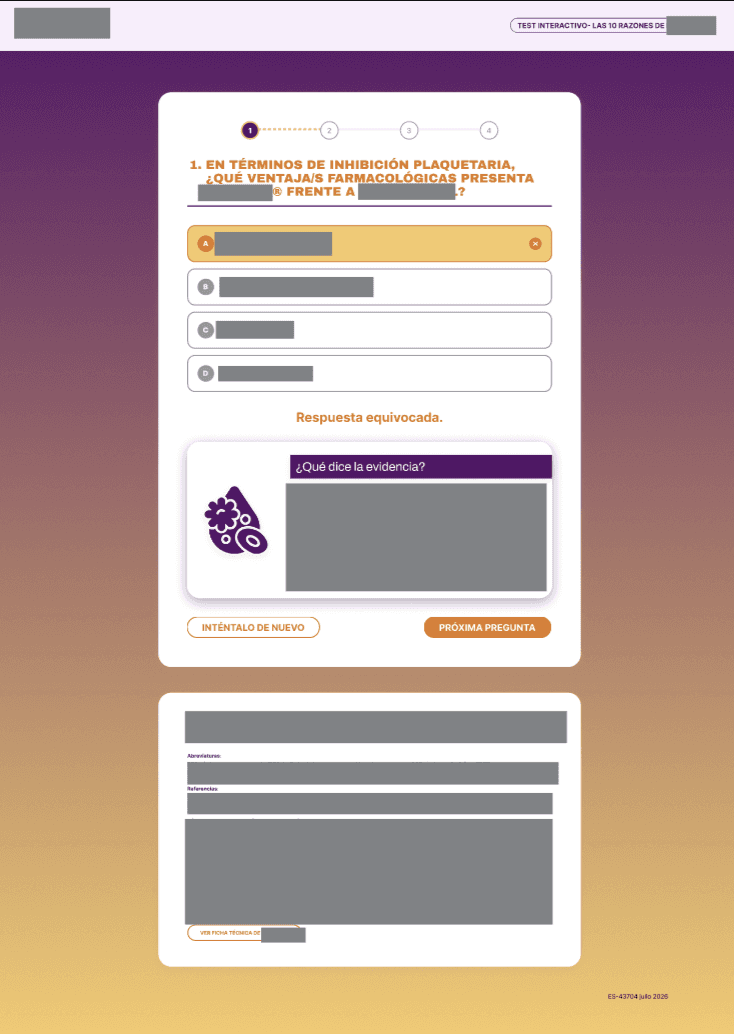
Instead of static explanations, I transformed incorrect answers into learning opportunities.
When users selected an incorrect answer, they were provided with a direct link to the relevant educational video from the campaign. This approach allowed physicians to revisit the source material, reinforce their knowledge, and continue engaging with the educational content.
Additional design decisions included:
A clean, distraction-free interface focused on readability.
Progressive question flow to reduce cognitive load.
Clear visual feedback after each interaction.
A final score screen summarizing performance.
Easy access to the latest campaign episode, encouraging continued learning beyond the assessment.
The experience balanced educational value with usability while requiring minimal additional content production from internal teams.
👀 UX Considerations
Throughout the design process, I focused on creating an experience that felt intuitive for a professional audience.
Key UX principles included:
Accessibility: Clear typography, strong contrast, and intuitive interaction patterns.
Feedback: Clear indication of quiz progress, correct and wrong answers and the scientific evidence behind them.
Low friction: The assessment could be completed quickly without unnecessary distractions.
Engagement: Every interaction was designed to encourage continued exploration of the educational campaign.
🚀 Outcome
The interactive quiz introduced a new way for healthcare professionals to engage with the campaign, moving beyond passive reading toward active participation.
From a business perspective, the experience helped:
Evaluate physicians' interest in interactive educational formats.
Increase engagement with existing campaign content.
Drive additional traffic back to previously published educational videos.
Create a reusable framework for future interactive learning experiences.
You can access the complete prototype at this link